
TL;DR
- The growth bottleneck was never ideas, it was the distance between the idea and another team having time to build it.
- Google Stitch (an AI prototyping tool by Google Labs) + Claude Code lets a growth marketer go from behavioural data to a validated mockup in hours, not weeks.
- Three real client cases: a carbon-emissions SaaS (≈70% of the usual cycle saved), a cyber insurer (replicable landing template), a bare-ownership proptech (simulation flow validated before a line of code).
- It does NOT replace a mature design system, and the AI signature is detectable without deep human personalisation.
- A copy-paste prompt structure is at the end.
As a growth marketer I don't just run campaigns. I design experiences, read behavioural data, coordinate teams, and now I also build the interfaces myself, sometimes all in the same day. For seven years the thing slowing me down was never a lack of ideas. It was the distance between the idea and someone else having time to build it.
Google Stitch (plus Claude Code) is what closed that gap for me. Below: what it actually is, three real client cases with the time each one saved, where it falls short, and the exact prompt I use, copy-paste ready at the end.
Why is dependency the real growth bottleneck?
If you've spent any time in digital marketing, you know the frustration. You have the hypothesis and the data to back it. You know exactly what should change in the landing page, the registration flow, the new-user experience. But between the idea and execution there are endless meetings, dozens of review rounds with design, a queue of developer tickets and at least three weeks on the calendar.
The problem was never creativity. It was the dependency on other teams.
The biggest bottleneck for a growth marketer isn't a lack of ideas, it's the distance between the idea and its execution.
For years this has been one of the hidden costs of digital marketing: the speed of learning is limited by the speed of iteration, and the speed of iteration depends on resources outside your control. Lately I've been testing Google Stitch, and between this and Claude Code, everything I just described has changed.
What was the glass ceiling of the traditional growth marketer?
Before going freelance I spent seven years in agencies. The ceiling was obvious: I was limited by the services the client had contracted. If I spotted an opportunity in the user experience or a page's design, my role was to document, recommend and push hard enough to sell the service. Execution belonged to another team, another calendar, their own criteria.
Going freelance gave me more freedom. Even so, for complex tasks, email marketing campaigns, web development, I still depended on other specialists to execute. My contribution was strategic, but someone else had to translate it into code.
The result: long review cycles, a game of telephone between my initial proposal and what actually went live, and clients who lost their early enthusiasm waiting to see something tangible.
What does the leap from operator to builder look like?
A few months ago I started experimenting with Claude Code, and now Google Stitch, to prototype digital products. What started as an internal test is now part of my regular workflow.
Now I can execute and deliver by myself, not as a replacement for a senior designer, but as someone who can materialise ideas with enough fidelity to validate them, present them, and even build and publish them.
The change isn't just operational, it's conceptual. When you can go from behavioural data to a functional mockup in hours, the conversations with clients shift completely. I no longer just present ideas, I present solutions. The difference in confidence and decision speed is enormous, especially in startups where the pace is already high.
What is Google Stitch and why does it matter now?
Google Stitch doesn't replace good taste or critical thinking. It amplifies them. The difference comes from whoever is using it.
Google Stitch is an AI-powered prototyping tool by Google Labs. It generates interface mockups, web pages and user flows from prompts, visual references and existing files. It understands context, style and structure, producing visual proposals you can iterate on fast, essentially a Figma on steroids.
In practice: a growth marketer with strong analytical judgment, behavioural data and clarity about what needs to change can produce concrete design proposals without mastering professional design tools.
What did three real client cases look like?
Case 1: Carbon emissions management SaaS
We evaluated a redesign of a landing page that helped users calculate their company's carbon emissions. The brief existed, usage data was in Clarity, but the design team's calendar was packed for weeks and developers had higher-priority UI work in the SaaS.
With Google Stitch I produced a complete landing proposal in a single morning: content structure, sections, visual hierarchy, main CTA, flow toward the tool. I iterated three versions before presenting. Feedback was positive from the first call. Time saved vs the traditional process: roughly 70% of the usual cycle.
Case 2: AI-powered digital risk insurer
Different challenge: not starting from scratch, but creating a replicable landing template for different resource types, industry landings, product landings, downloadable resources, each keeping brand consistency while adapting to its audience.
I uploaded the existing site files, defined the variations and generated the template skeleton. The result was a modular system the internal team adopted directly. That said: a mockup doesn't translate straight into development. Stitch usually won't produce a landing perfectly faithful to a company's brand, several revision rounds and adjustments are needed.
Case 3: Buy-and-sell bare-ownership real-estate proptech
The client sells a specialised financial product: bare ownership. Complex, and it has to be explained clearly before the user decides anything.
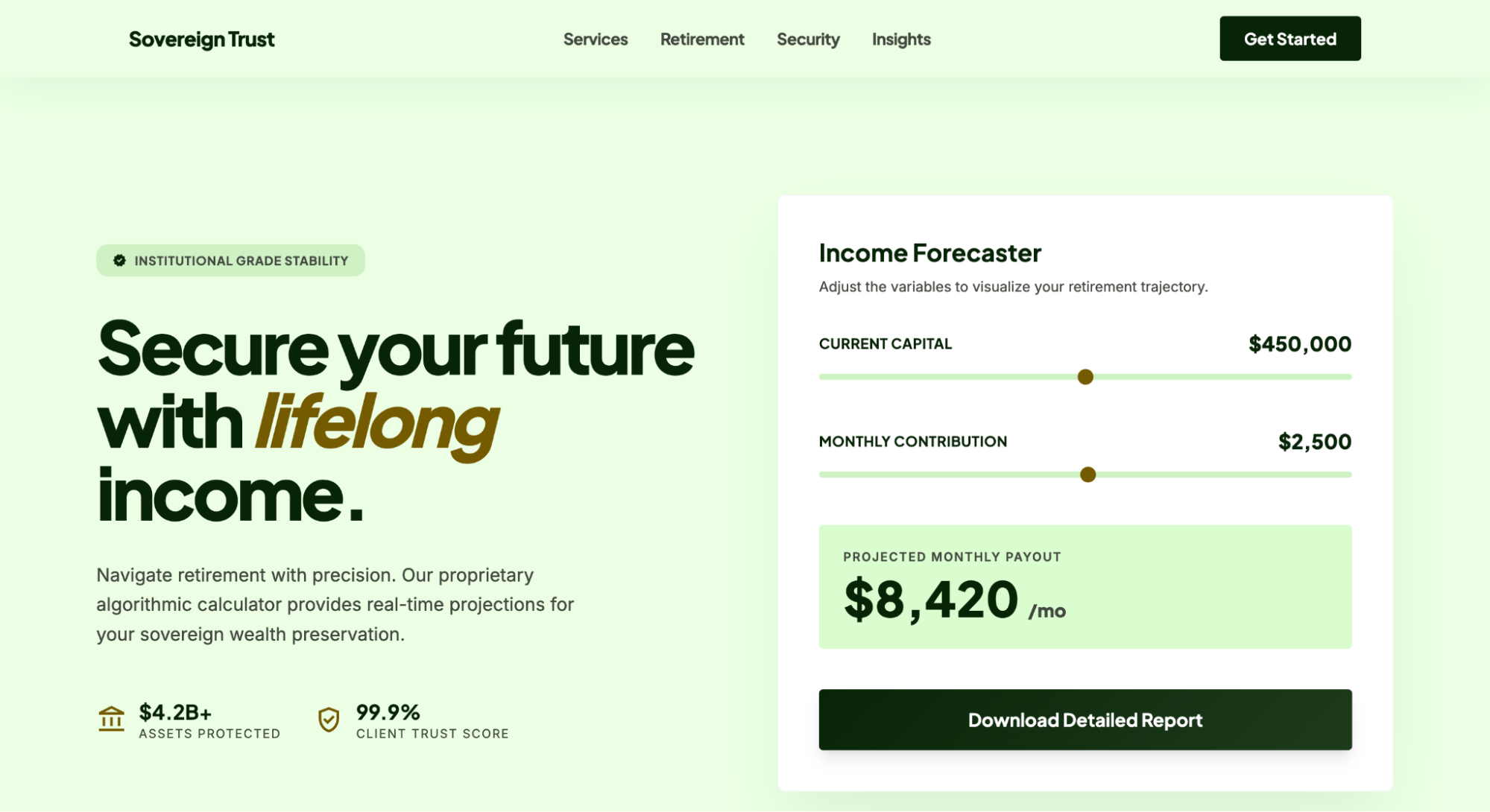
The challenge was a simulation flow that guided the user step by step, reduced cognitive friction and built enough trust to prompt a call request. We already had a calculator built with Outgrow producing great results, but as we migrated all landings to the company's own site, we generated the new flow prototype from Clarity behavioural data and specific Stitch prompts. The client could see the user-journey logic clearly before a single line of code was written. Again: the landing designed in Stitch is not a 100% accurate representation of what ends up in development.

What's the workflow, step by step?
This is the workflow I've standardised, and it consistently produces reliable results:
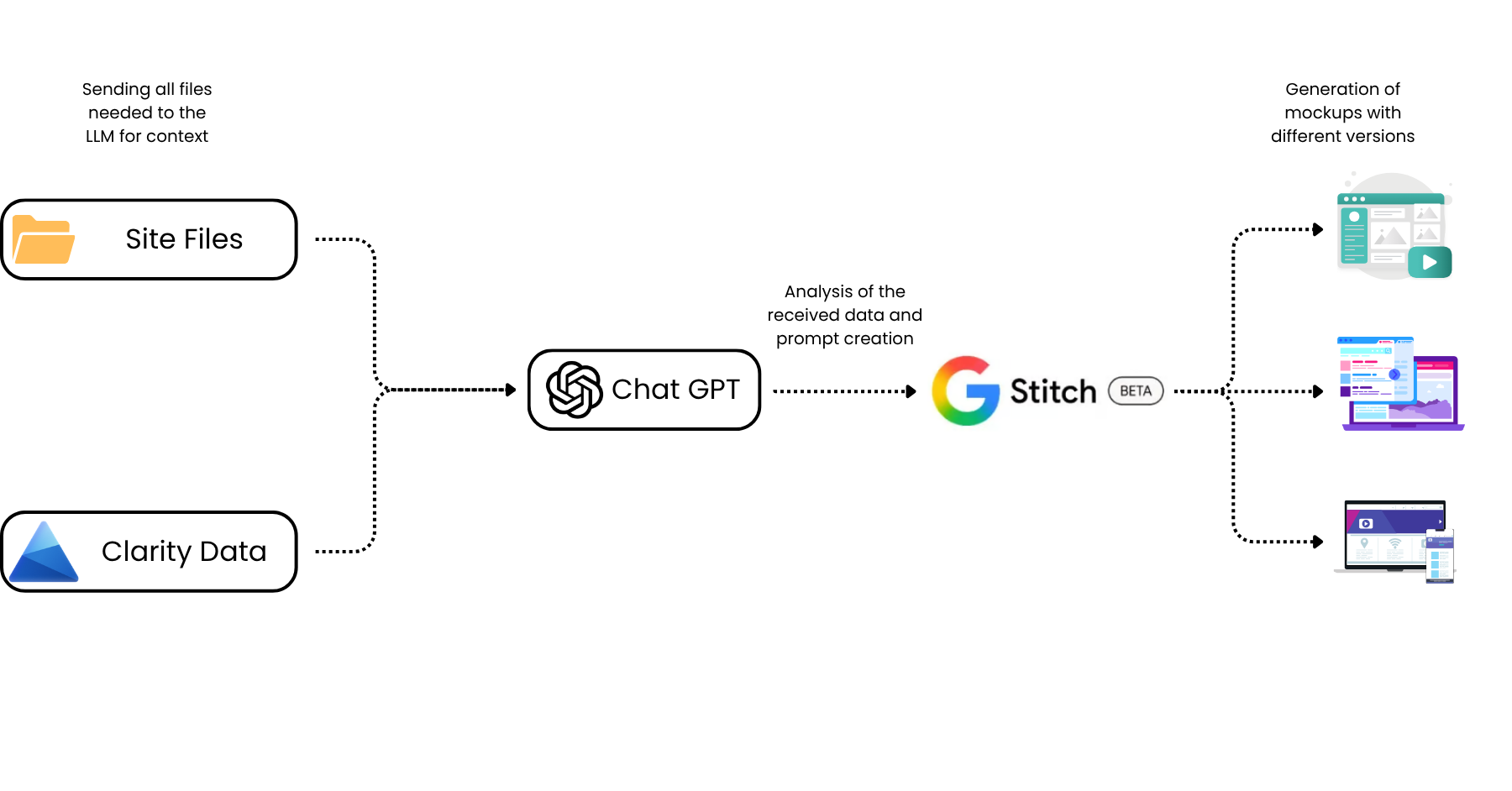
- Upload the current website files to Claude Web. This gives structural, style and content context. The model understands where the design starts, so it's not working in a vacuum.
- Load Microsoft Clarity data. Session recordings, heatmaps, drop-off zones, rage clicks. This turns intuition into hypotheses grounded in real user behaviour.
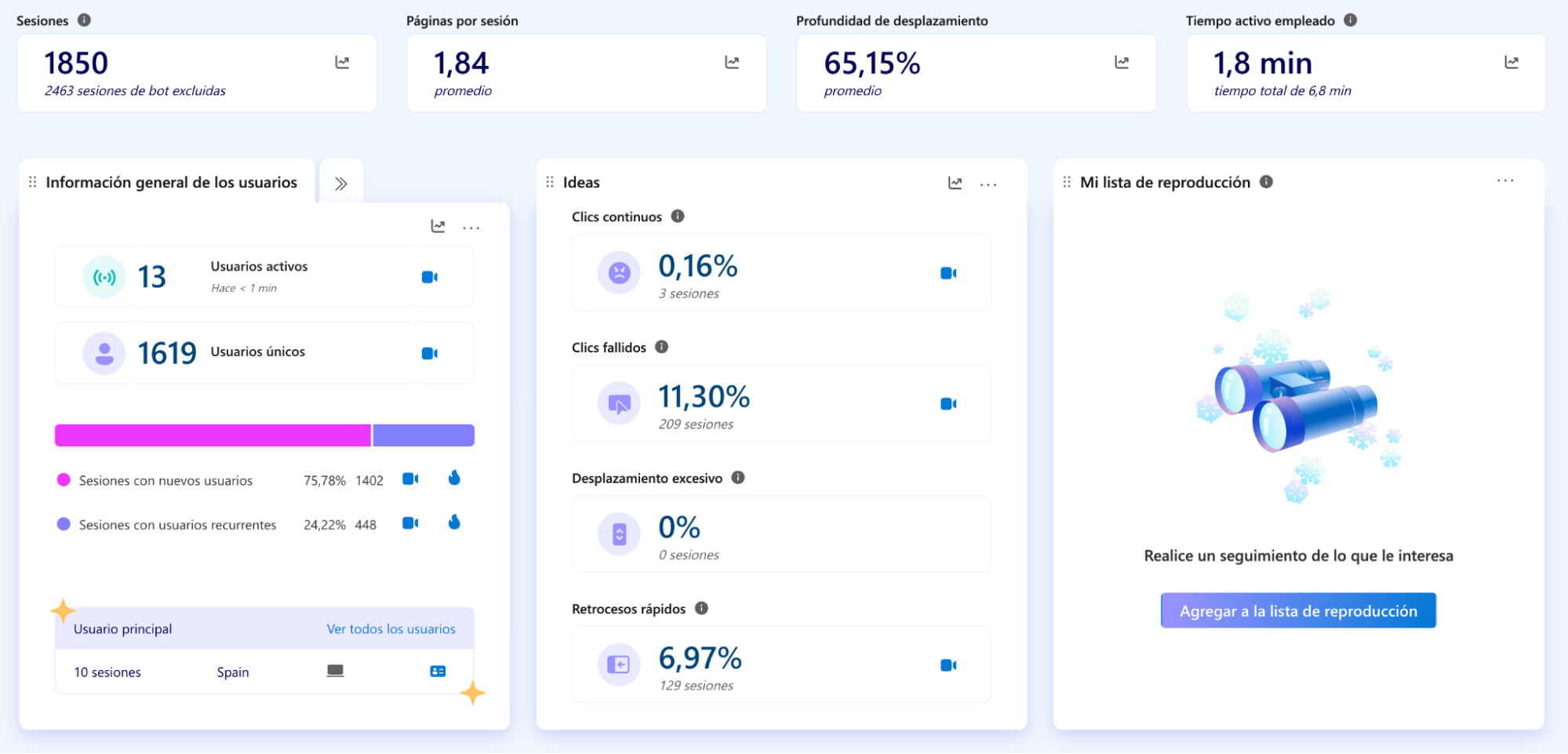
- Analyse the behaviour. With both sources, the AI identifies specific friction points: where attention drops, where there's visual confusion, where the CTA isn't converting.
- Generate the prompts for Google Stitch. A vague prompt produces vague results. A prompt with brand context, audience, conversion goal and style reference produces useful proposals. Given all that context, the AI itself writes a far more precise Stitch prompt than I would on my own.
- Create the mockups and iterate. Stitch generates visual options you refine in real time. Three or four iterations in an hour or two is realistic.
- Validate with the client before development. The most underrated advantage: the client sees something tangible before a single line of code exists. Feedback at this stage is far more useful and precise.
- Move to development or Claude Code. Once validated, the handoff is much cleaner. With Claude Code, translating the mockup into functional code is simpler because you can download the prototype as HTML.
Does this change the rules, or just the tools?
Speed
The traditional design cycle carries enormous hidden costs: briefing meeting, proposal, review, adjustments, second review, approval. This workflow compresses that into hours. Three weeks can become three days once you factor in the meetings. And in growth, the speed of iteration is directly proportional to the speed of learning, the more data you have, the better you understand your audience.
Independence
Operational autonomy changes the nature of the work. I present complete solutions, not just recommendations. That directly affects how clients perceive the value I bring, and how fast decisions get made.
Alignment between data and UX
The deepest advantage isn't speed, it's the quality of the connection between the analytical insight and the design proposal. When the person analysing behaviour and the person defining the experience are the same, less gets lost in translation. The design doesn't interpret the data, it incorporates it directly.
For me, the biggest loss in growth isn't traffic, it's having to play telephone with the rest of the teams.
What does Google Stitch NOT do (and where does it fall short)?
This section exists because honesty is part of having good judgment. Stitch is powerful, but it has real limits worth knowing before you overestimate it.
- It doesn't replace a mature design system. If your company has a consolidated style guide, defined components and a design team with their own criteria, Stitch won't replicate that consistency without significant extra work. In my experience it's hard for someone without a trained designer's judgment to replicate what a real designer produces.
- It requires structured inputs and judgment. A vague prompt produces a generic result. Output quality depends directly on input quality: brand context, conversion objective, visual reference, design constraints. If you don't have a clear picture of what you want, the tool won't find it for you.
- The AI signature is detectable. AI-generated websites follow a recognisable pattern. Users notice when personalised content is missing: real images, proprietary data, specific cases, sections built on genuine experience. A Stitch prototype that reaches production without deep personalisation shows. That personalisation is still human work. My own site, however polished, has sections clearly attributable to AI, and I'll say that plainly rather than pretend otherwise.
- It's not the final step. It's the starting point for the handoff to development. The resulting code needs review, the design needs adapting to existing systems, and the final experience still needs real iteration on the data users generate.
What does this mean for founders and growth marketers?
For founders and product teams
If your startup is in growth phase and your growth marketer needs a three-week cycle to test website changes, that process has a lot of room for improvement. The tools exist to shorten it. The profile you want isn't just someone who optimises campaigns or coordinates teams, it's someone who can close the loop between user data and the experience that user receives, with tools that keep them on the front line.
For growth marketers
The question isn't whether to learn prototyping tools. It's how much longer you can differentiate yourself with campaigns alone. The market is rewarding profiles that expand their execution range. Mastering the space between data and interface is a real competitive advantage, and it's getting more accessible every month.
The growth marketer of the next cycle won't just be a better analyst. They'll also be a better builder.
Where is this heading?
The separation between whoever designs growth and whoever builds the experience has always been artificial. The product is the marketing. The user experience is the most important campaign you have.
What's changing is that tools are removing the execution barriers that kept that separation alive for years. A growth marketer who knows where users drop off, why they don't convert, and what hypothesis they want to test can now materialise it without waiting for anyone. That doesn't make designers or developers dispensable, it means the learning loop shortens substantially, and the profile who closes it has a growing edge.
I still think Google Stitch is early-stage to be called "the tool that puts web designers out of work", but it definitely opens up the conversation about what one person can now execute across digital marketing.
The growth marketer who can go from data to prototype in the same day is no longer an outlier. That's starting to become the standard.
So here's my honest question back to you: what's the longest you've waited to ship a change you already knew would work, and what did that wait cost?
Ready-to-use prompt for Google Stitch
If you've read this far, you deserve something useful. Below is the prompt structure I'm currently using to produce valuable mockups with Google Stitch.
Design a highly conversion-focused landing page mockup for a B2B SaaS platform.

Strictly follow the structure, style and requirements defined below.

---

[1. OBJECTIVE]

Create a landing page that maximises conversion (demo, sign-up or contact),
clearly communicating the product's value.

---

[2. PRODUCT DESCRIPTION]

Product name:
[INSERT NAME]

Brief description:
[DESCRIBE IN 1–2 SENTENCES WHAT IT DOES]

What it allows the user to do:
- [MAIN FUNCTIONALITY 1]
- [MAIN FUNCTIONALITY 2]
- [MAIN FUNCTIONALITY 3]
- [MAIN FUNCTIONALITY 4]
- [PROBLEM IT ELIMINATES]

---

[3. TARGET AUDIENCE]

Profiles:
- [PROFILE 1]
- [PROFILE 2]
- [PROFILE 3]
- [PROFILE 4]

Audience characteristics:
- Technical level: [LOW / MEDIUM / HIGH]
- Current tools: [TOOLS]
- Frustrations: [KEY PAINS]
- What they're looking for: [BENEFITS]
- Level of scepticism: [LOW / MEDIUM / HIGH]

---

[4. VALUE PROPOSITION]

Main proposition:
"[CLEAR, OUTCOME-ORIENTED PROPOSITION]"

Alternative angles:
- "[ANGLE 1]"
- "[ANGLE 2]"
- "[ANGLE 3]"

---

[5. LANDING PAGE STRUCTURE]

5.1 Hero Section
- Headline focused on outcome (speed, clarity, ROI, etc.)
- Subtitle explaining the product simply
- Main CTA: [E.G. "Request a demo"]
- Secondary CTA: [E.G. "See how it works"]
- Visual: [DESCRIBE VISUAL IDEA]

---

5.2 Problem Section
Show clearly:
- [PROBLEM 1]
- [PROBLEM 2]
- [PROBLEM 3]
- [PROBLEM 4]
Use visual contrast: chaos vs clarity

---

5.3 Solution Section
Explain how it works:
1. [STEP 1]
2. [STEP 2]
3. [STEP 3]
4. [STEP 4]
Represent as a simple visual flow

---

5.4 Features / Functionality
Present in cards:
- [FEATURE 1]
- [FEATURE 2]
- [FEATURE 3]
- [FEATURE 4]
- [FEATURE 5]
- [FEATURE 6]

---

5.5 Use Cases
Format:
Input (user question) → Output (answer/insight)

Examples:
- "[QUESTION 1]"
- "[QUESTION 2]"
- "[QUESTION 3]"
- "[QUESTION 4]"

---

5.6 Social Proof
- Logos: [COMPANIES]
- Testimonials: [TYPE OF PROFILE]

---

5.7 How It Works (technical, simplified)
- [MAIN LAYER]
- [APIs / INTEGRATIONS]
- [INTERFACE]
- [OUTPUTS]
Maintain credibility without excessive complexity

---

5.8 Final CTA
- Reinforce value proposition
- Main CTA: [CTA]
- Secondary CTA: [OPTIONAL]

---

[6. DESIGN STYLE]
- Modern, minimalist, clean
- Inspiration: Stripe, Linear, Vercel (or similar)
- Professional (avoid generic style)
- Explore light or dark mode
- Use:
  - Subtle gradients
  - Grids
  - Data visualisations
- Include real product mockups

---

[7. TONE]
- Clear and direct
- Confident and technical but accessible
- No unnecessary buzzwords
- Focused on results

---

[8. OUTPUT REQUIREMENTS]
- Complete landing mockup
- Desktop-first (responsive optional)
- Include:
  - Charts
  - Tables
  - Query-type interfaces
- Use placeholders only if necessary

---

[9. STRATEGIC DIRECTION]
- Avoid generic SaaS templates
- Position the product as:
  [E.G. "Data infrastructure", "Intelligence layer", etc.]

The design must convey:
- Precision
- Power
- Trust

---

Generate the complete landing following this structure.
If you work on a SaaS, insurtech, proptech, or any sector where user experience is part of the acquisition funnel, and you want to explore how to shorten the cycle between insight and execution, you can book a call with me through the form.
FAQ
Is Google Stitch free?
Google Stitch is a Google Labs prototyping tool you access for prototyping; the value here is the workflow and the prompt structure, both free in this article. The cost is your time and judgment, not a licence.
Does Google Stitch replace designers?
No. It doesn't replace a mature design system or a trained designer's judgment. It lets someone with analytical judgment and behavioural data produce validatable proposals faster, the deep personalisation is still human work.
Can a non-designer actually use it?
Yes, if you bring structured inputs: brand context, conversion goal, visual reference, real user data. A vague prompt produces a generic result; the output quality tracks the input quality.
How much time does it really save?
In Case 1 here, roughly 70% of the usual design cycle, three weeks compressed toward three days once meetings are factored in. It varies by brand-fidelity requirements.
Does AI-generated design hurt credibility?
It can. The AI signature is detectable when real images, proprietary data and genuine experience are missing. A prototype that ships without deep personalisation shows, that's the part you can't skip.
Stitch vs Figma vs Claude Code, when do I use which?
Stitch to generate and iterate the mockup from data, Claude Code to turn the validated prototype into functional code (download as HTML), Figma if you need a mature component system the team already maintains.